Productivity & Personal Tools
ChocolateBar
Menu bar manager with a second row for hidden icons on Mac
Mac menu bar manager that hides crowded icons or displays them in a second row below the menu bar, working on Intel and Apple Silicon from macOS 12 through 15.
About the work
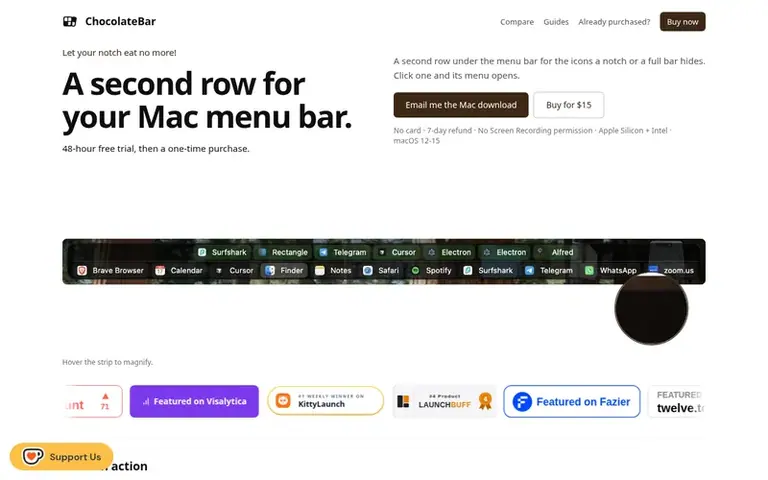
ChocolateBar: the homepage
ChocolateBar solves the problem of Mac menu bars running out of space when too many third-party app icons crowd them, or when icons get hidden behind the notch on newer MacBook Pros. The app lets you hide those icons or display them full-size in a second row that opens with a keyboard shortcut or click, in either horizontal or vertical orientation. It works as a universal binary on Intel and Apple Silicon Macs running macOS 12 Monterey through 15 Sequoia, reads menu bar items through macOS Accessibility API, and requires only Accessibility permission—never Screen Recording. New menu bar icons appear automatically in the second row once installed.
On display
- Hide third-party icons from menu bar
- Display hidden icons in a second row below menu bar
- Horizontal or vertical strip orientation
- Open strip with keyboard shortcut or click
- Show running apps as optional chips
- New menu bar icons appear automatically
- Accessibility permission only, no Screen Recording needed
- Save and switch between multiple menu bar profiles
- Works on macOS 12 Monterey through 15 Sequoia
- Universal binary for Apple Silicon and Intel
Pricing
Pricing model: Paid
$15 one-time, or $12 with LAUNCH30 code for the next 20 buyers
Compare and explore
See the alternatives to ChocolateBar, ChocolateBar vs LarpLess, more in Productivity & Personal Tools.
Follow ChocolateBar and hear about their milestones, new launches and demo videos by email. Stop any time.
ChocolateBar: wall label
ChocolateBar: metrics
Appraisal of chocolatebar.app: Ahrefs Domain Rating and Majestic link provenance, with the change since the last viewing.
- Domain Rating
- 12
- no change since last check
- Trust Flow
- 6
- no change since last check
- Citation Flow
- 23
- no change since last check
- Referring domains
- 35
- no change since last check
- External backlinks
- 78
- no change since last check
Ahrefs Domain Rating appraised 22 Nov 2026, re-hung 20 Nov 2026. Collection topic: Computers/Data Formats (5). Majestic appraised 20 Nov 2026, re-hung 20 Nov 2026. Link provenance: Majestic. Trust Flow, Citation Flow and Topical Trust Flow are trademarks of Majestic-12 Ltd.
ChocolateBar: domain provenance
Trace the provenance
Checked 21 Nov 2026, 16:21 UTC from the public RDAP record.
- Domain age
- 6 months
- Registered
- Expires
- Registrar
- CloudFlare, Inc.
- DNSSEC
- Not signed
ChocolateBar: launch provenance
What we have measured for ChocolateBar since it went live on Novara Launch on 20 November 2026.
- Domain Rating (Ahrefs)
- 12 no change since launch
- 12 at launch (20 Nov 2026), 12 on 21 Nov 2026
- Trust Flow (Majestic)
- 6
- First measured 20 Nov 2026
- Referring domains (Majestic)
- 35
- First measured 20 Nov 2026
Day 1 since launch. Next receipt: day 30, 20 Dec 2026. The figures report a change; they do not say what caused it, and many things can. No figure here is a guess.
Before you launch
See the playbook for a plain launch checklist and the launch directories worth adding your product to.
Visitors ask
- What problem does ChocolateBar solve?
- It gives your menu bar more room when it runs out of space. You can hide the third-party icons crowding the bar, or show them in a second row below the menu bar that opens with ⇧⌘B or a click on the ChocolateBar icon.
- How do I install ChocolateBar?
- Download the DMG file, double-click to mount it, drag ChocolateBar to your Applications folder, then launch it. macOS will ask for Accessibility permission on first run, which takes one click in System Settings.
- Can it hide menu bar icons like Bartender?
- Yes. An optional toggle hides the third-party icons cluttering your menu bar, and you can peek at them with a chevron. ChocolateBar can also show those same icons full size in a second row so you can keep the bar clean and still reach every icon.
- Does ChocolateBar work on Intel Mac?
- Yes. ChocolateBar for Mac is a universal binary for Apple Silicon and Intel, does not need Rosetta, and runs on macOS 12 Monterey through 15 Sequoia.
- Why does ChocolateBar need Accessibility permission?
- Apple doesn't give apps a public way to read another app's menu bar items. Accessibility is the only workaround. ChocolateBar uses it to find your hidden icons and open their menus when you click them, and nothing it reads from your menu bar leaves your Mac.
Leave a review for ChocolateBar
No one has reviewed ChocolateBar for the gallery yet. Be first. Every review is free. None are bought.
ChocolateBar has a free listing. The owner can unlock the full profile with a paid launch for $5:
- Founder story (locked)
- Milestones (locked)
- Demo video (locked)
- Dofollow website link: not on this free listing (its website link is nofollow)
In the same gallery
-
No. 1
Number 1: LarpLess
Break down your study session into what you were actually doing
Productivity & Personal ToolsTurkey
DR 0 no change since last check 0 votes. Log in to admire LarpLess with a vote